An AI agent uses a model to interpret a goal, select tools and move a task forward. For a business, the important difference is its ability to propose or carry out operations in connected systems, rather than simply hold a conversation.
That ability needs boundaries. Checking an order, drafting a reply and changing a delivery date require different permissions and have different consequences. Decide what the system may do, who checks its output and how errors are detected before choosing a model.
This guide describes a possible architecture and a way to evaluate it. The scenarios are examples of application, not customer projects or results.
What makes up an agent?
The language model interprets a request and produces text or tool requests. Knowing the word “ERP” does not give it access to one. An application must validate each request and execute only permitted operations.
Tools expose specific operations, such as finding an order or preparing a draft. An API exchanges data with another application. Credentials stay on the server; the integration defines fields, limits and conditions. Context contains the task, tool results and information needed for the next step. Any memory needs a defined purpose, retention period and access rules.
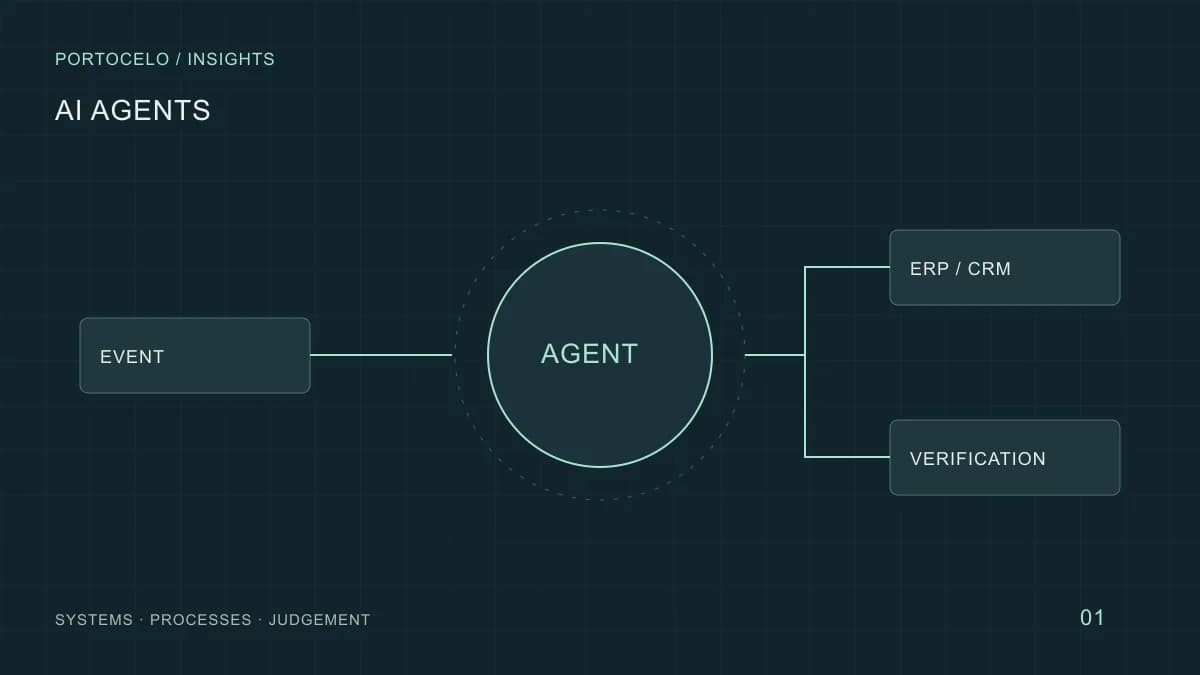
The model proposes a step; the application controls execution and a person approves actions that need review.
- User or event
A request or change starts the task.
- Agent and context
Interpret the goal and its limits.
- Step selection
Propose a tool and arguments.
- Tools
Validate identity and permissions.
- ERP, CRM or email
Read data or prepare a limited operation.
- Verification
Check the result and escalate exceptions.
Conceptual architecture by Portocelo. An approval can stop the flow before a write operation or an external message.
An audit should capture authorised inputs, tool calls and outcomes. It does not need to store a supposed internal chain of reasoning from the model.
Chatbot, workflow and agent are different design choices
A chatbot is a conversational interface. It may be connected to tools. A workflow fixes the order or conditions of steps in code. In an agent, the model chooses part of that path. These approaches can be combined; none is automatically better.
| Need | Reasonable starting design | Essential control |
|---|---|---|
| Answer a question about opening hours | Search or conversation with sources | Current information |
| Validate a form and send a notice | Rules-based workflow | Field and recipient validation |
| Investigate an incident across systems | Agent with read-only tools | Permissions and step limits |
| Make a contractual change | Assisted preparation and approval | Explicit review before execution |
The distinction between fixed workflows and agents that select tools is also explained in Anthropic’s architecture guide. It is a useful conceptual reference, not a requirement to use that provider.
Example of application: a delayed order enquiry
A distributor receives an email asking about a delivery. A limited service account looks up the order in the ERP. If two orders match, the system asks for clarification instead of guessing. It checks logistics data and drafts a reply that separates confirmed facts from pending information.
Changing an address or issuing a refund stays outside this scope. A reviewer sees the original message, retrieved data and proposed reply before sending. If the ERP fails, the task remains pending with a clear reason; the agent must not invent a date. An operation identifier prevents duplicate emails when a request is retried.
Set autonomy action by action
A first pilot can allow automatic lookups while requiring approval for changes. Give the system narrow tools such as “prepare a refund”, rather than generic write access to the ERP.
- Separate read and write tools and authorise each one on the server.
- Limit time, calls and retries; stop loops.
- Show the reviewer the exact record and change before approval.
- Recheck state before executing an approved action if the data may have changed.
- Keep a manual path when the system cannot finish.
An email or PDF may contain malicious instructions. Treat it as untrusted data: it cannot grant permissions, choose a payment account or disable review. The application must enforce these boundaries even if the model makes a mistake.
Evaluate before connecting it to daily operations
Start with representative examples separate from those used to tune the instructions. Include routine cases, conflicting information, missing data, insufficient permissions and tool failures. Define expected results and prohibited actions for each case.
First run in observation mode: the system makes proposals without changing records or sending messages. Compare the result with human work, including correctness, completeness and review effort. An attractive average can hide a serious error in a rare case.
Agree an owner, stop conditions and a manual fallback before expanding permissions. Repeat evaluation when the model, tools or sources change. For questions about manuals, a RAG documentation assistant may be more suitable than an agent that can act.
Costs and cases where an agent does not pay off
Count integration, data preparation, evaluation, infrastructure, model use and exception handling. Token costs alone leave out much of the work. A system that saves drafting time but requires checking five screens may not reduce total effort.
Compare cost per correctly completed task, including review, and monitor latency and abandoned operations. Low volume, fragile integrations or a lack of reviewers may make process improvement the better first step. Do not add multiple agents unless an evaluation shows a concrete advantage.
Describe a real task, its inputs, systems and cost of error. The guide to choosing an automation candidate helps structure that discussion; our AI agents service covers design and integration.
From knowledge to a working process
An agent for a specific process.
We can examine the tools it needs, the actions it should prepare and where human approval belongs.
Discuss your AI agent ↗Sources and references
- Anthropic: Building effective agents · Checked: